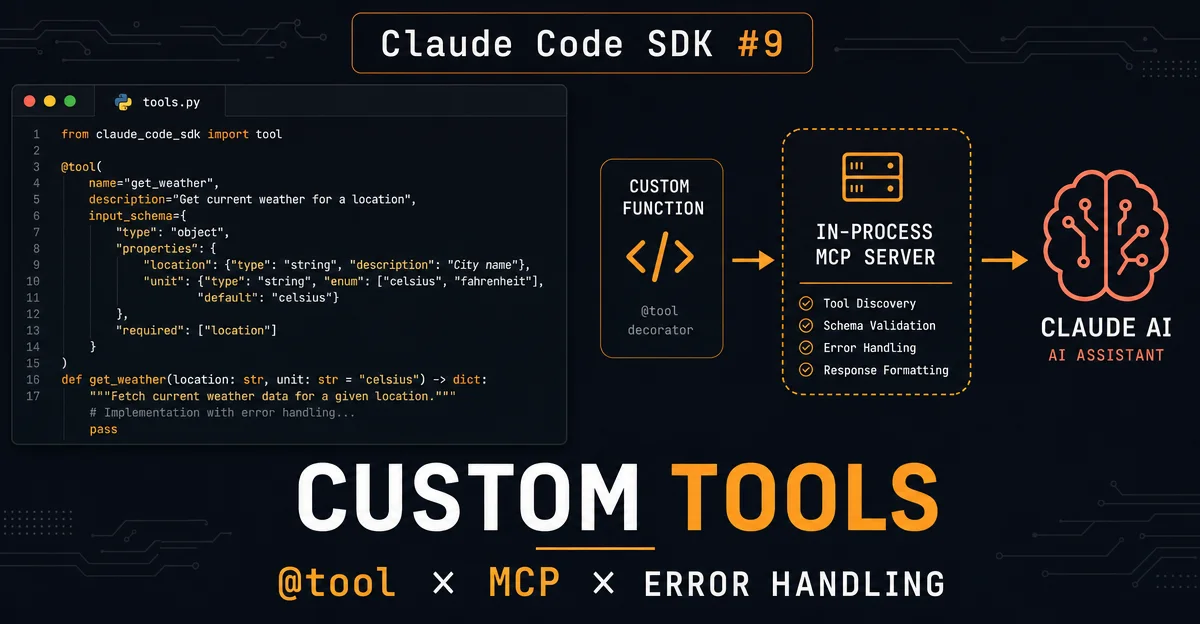
Claude Code SDK #9:自定义工具全解——@tool 装饰器 × in-process MCP × 错误处理 × 非文本返回,把任意函数变成 Claude 的能力
自定义工具是 Claude Code SDK 把 Agent 能力扩展到任意外部系统的核心机制。本篇完整拆解工具四要素(Name/Description/Input Schema/Handler)、Python @tool 装饰器与 create_sdk_mcp_server 注册流程、mcp__{server}__{tool} 命名规范与通配符放行、readOnlyHint 并行加速、throw 与 is_error 的错误处理差异、image/resource/structuredContent 非文本返回,以及 JSON Schema 枚举参数全写法,附完整可运行 Python 示例和五条实践建议。

内置的 11 种工具不够用怎么办?答案是自定义工具。
Claude Code SDK 提供了一套 in-process MCP 机制:用
@tool 装饰器把一个普通 async 函数包装成工具,再把它挂到 query() 上,Claude 就能在对话中直接调用你的代码——查数据库、打外部 API、做域内计算,全部可以。本篇完整拆解自定义工具的定义方式、注册流程、权限配置、错误处理,以及返回图片/结构化数据的写法,附可直接运行的 Python 示例。1一个工具由四部分组成
每一个自定义工具都由四个要素构成,传给
@tool 装饰器或 TypeScript 的 tool() 函数:| 要素 | 作用 | 写法 |
|---|---|---|
| Name | Claude 调用时使用的唯一标识符 | 字符串,如 "get_temperature" |
| Description | 告诉 Claude 这个工具做什么、何时调用 | 越具体越好,直接影响模型选工具的准确率 |
| Input Schema | Claude 调用时必须提供的参数及类型 | Python:{"latitude": float};TypeScript:Zod schema |
| Handler | 实际执行逻辑的 async 函数 | 接收 args: dict,返回含 content 字段的 dict |
Handler 的返回值结构固定:必须有
content(结果块数组),可选 structuredContent(机器可读 JSON)和 is_error(标记失败)。这四个要素中,Description 对模型行为影响最大。Claude 读 Description 来判断要不要调这个工具,写模糊了会导致调用时机不准,写清楚了才能达到期望效果。
Python 实战:天气工具
以下是一个完整示例:定义
get_temperature 工具,从公开气象 API 拉取当前温度:1from typing import Any
import httpx
from claude_agent_sdk import tool, create_sdk_mcp_server
@tool(
"get_temperature",
"Get the current temperature at a location",
{"latitude": float, "longitude": float},
)
async def get_temperature(args: dict[str, Any]) -> dict[str, Any]:
async with httpx.AsyncClient() as client:
response = await client.get(
"https://api.open-meteo.com/v1/forecast",
params={
"latitude": args["latitude"],
"longitude": args["longitude"],
"current": "temperature_2m",
"temperature_unit": "fahrenheit",
},
)
data = response.json()
return {
"content": [
{
"type": "text",
"text": f"Temperature: {data['current']['temperature_2m']}°F",
}
]
}
# 打包成 in-process MCP server
weather_server = create_sdk_mcp_server(
name="weather",
version="1.0.0",
tools=[get_temperature],
)注意
create_sdk_mcp_server 的关键点:它跑在进程内部,不是一个独立子进程,也不需要 stdio 通信。与 #8 MCP 集成篇里介绍的外部 MCP server 相比,这种方式延迟更低,部署更简单。注册工具 + allowedTools 命名规范
光定义了工具还不够,要把它传给
query() 才能跑起来。MCP server 挂在 mcp_servers 字典里,字典的键名就是 server name,自动决定工具的完整名称格式:mcp__{server_name}__{tool_name}以上例为例,
server name="weather",tool name="get_temperature",最终暴露给 Claude 的工具名是 mcp__weather__get_temperature。把它加进 allowed_tools,Claude 调用时就不需要人工确认:from claude_agent_sdk import query, ClaudeAgentOptions, ResultMessage
async def main():
options = ClaudeAgentOptions(
mcp_servers={"weather": weather_server},
allowed_tools=["mcp__weather__get_temperature"],
)
async for message in query(
prompt="What's the temperature in San Francisco?",
options=options,
):
if isinstance(message, ResultMessage) and message.subtype == "success":
print(message.result)一个 server 可以放多个工具。多工具时
allowed_tools 可以逐个列出,也可以用通配符 mcp__weather__* 一次性放行该 server 下的所有工具。readOnlyHint:让 Claude 并行调用工具
工具 Annotation 是一组可选元数据,描述工具的行为特征。四个字段都是 bool 值:1
| 字段 | 默认值 | 含义 |
|---|---|---|
readOnlyHint | false | 工具不修改环境(控制是否允许并行调用) |
destructiveHint | true | 工具可能执行破坏性写操作(仅提示,不强制) |
idempotentHint | false | 重复调用同参数无副作用(仅提示,不强制) |
openWorldHint | true | 工具会访问进程外系统(仅提示,不强制) |
其中
readOnlyHint 是唯一影响实际执行行为的字段:标记为 true 后,Claude 可以把多个只读工具批量并行调用,显著缩短多步查询的总耗时。只查不改的工具都应该加上这个标记。from claude_agent_sdk import tool, ToolAnnotations
@tool(
"get_temperature",
"Get the current temperature at a location",
{"latitude": float, "longitude": float},
annotations=ToolAnnotations(readOnlyHint=True), # 允许并行
)
async def get_temperature(args):
return {"content": [{"type": "text", "text": "..."}]}其他三个字段是提示性元数据,模型和宿主系统可以参考,但不影响实际工具是否被执行。
错误处理:throw vs is_error
这是自定义工具最容易踩的坑,必须搞清楚两者的区别:
抛出未捕获异常 → Agent loop 终止,Claude 看不到错误信息,整个
query() 调用失败。捕获异常、返回
is_error: True → Agent loop 继续,Claude 看到错误内容,可以重试、换工具或告知用户原因。绝大多数场景下,你应该在 handler 内部
try/except 所有可能出错的路径,把失败信息包在 content 里返回: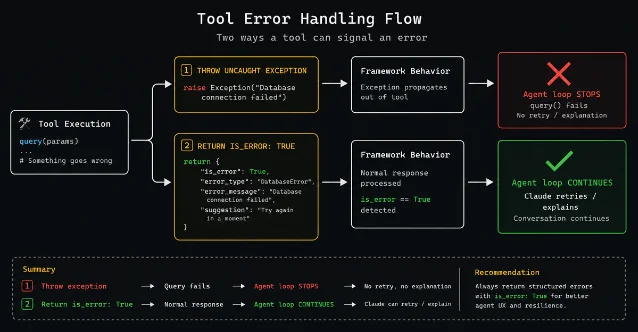
@tool("fetch_data", "Fetch data from an API", {"endpoint": str})
async def fetch_data(args: dict[str, Any]) -> dict[str, Any]:
    try:
        async with httpx.AsyncClient() as client:
            response = await client.get(args["endpoint"])
            if response.status_code != 200:
                return {
                    "content": [{
                        "type": "text",
                        "text": f"API error: {response.status_code} {response.reason_phrase}",
                    }],
                    "is_error": True,  # 通知 Claude 这次调用失败了
                }
            data = response.json()
            return {"content": [{"type": "text", "text": json.dumps(data, indent=2)}]}
    except Exception as e:
        return {
            "content": [{"type": "text", "text": f"Failed to fetch data: {str(e)}"}],
            "is_error": True,
        }
is_error: True 让 Claude 把工具返回当成错误信号来处理——它可能重试,可能换思路,但不会把错误字符串当正常数据吞掉。返回图片和结构化数据
content 数组支持三种类型的块:text、image、resource,可以混用。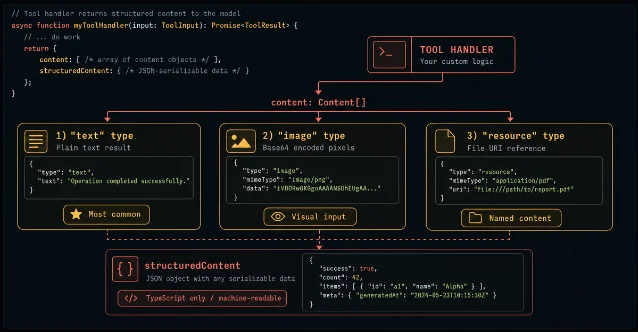
返回图片:需要把图片字节 base64 编码后内联传递,没有 URL 字段。从 URL 拉图片时先 fetch 拿到 bytes,再编码:
import base64
import httpx

@tool("fetch_image", "Fetch an image from a URL", {"url": str})
async def fetch_image(args):
    async with httpx.AsyncClient() as client:
        response = await client.get(args["url"])
        return {
            "content": [{
                "type": "image",
                "data": base64.b64encode(response.content).decode("ascii"),
                "mimeType": response.headers.get("content-type", "image/png"),
            }]
        }
返回 Resource 块:适合工具产出一个「有名字的文件或记录」的场景,用 URI 作为引用标签,实际内容放在
text 或 blob 字段里。URI 只是 Claude 用来引用的标签,SDK 不会真的去读这个路径:{
"type": "resource",
"resource": {
"uri": "file:///tmp/report.md", # Claude 引用这个标签,不是 SDK 实际路径
"mimeType": "text/markdown",
"text": "# Report\n..." # 实际内容内联
}
}返回 structuredContent(TypeScript 专属):在
content 之外追加机器可读 JSON,Claude 直接读字段而不是解析文本。Python @tool 暂不支持 structuredContent,需要改用独立 MCP server 才能使用。处理枚举参数:JSON Schema 全写法
Python 的 dict schema(如
{"latitude": float})不支持枚举约束,遇到需要限定取值范围的参数时,必须换成完整的 JSON Schema 格式:@tool(
"convert_units",
"Convert a value from one unit to another",
{
"type": "object",
"properties": {
"unit_type": {
"type": "string",
"enum": ["length", "temperature", "weight"], # 枚举约束
"description": "Category of unit",
},
"from_unit": {"type": "string", "description": "Unit to convert from"},
"to_unit": {"type": "string", "description": "Unit to convert to"},
"value": {"type": "number", "description": "Value to convert"},
},
"required": ["unit_type", "from_unit", "to_unit", "value"],
},
)
async def convert_units(args: dict[str, Any]) -> dict[str, Any]:
...TypeScript 里对应用
z.enum(["length", "temperature", "weight"]) 即可,Zod 自动转成 JSON Schema。可选参数的处理有两种思路:TypeScript 用
.default() 指定默认值;Python 则把参数从 schema 里去掉(schema 里的每个键默认 required),在 handler 里用 args.get("hours", 12) 读取。五条实践建议
- Description 写具体用途,不写工具名。
"Get weather data"不如"Get the current temperature at a latitude/longitude coordinate in Fahrenheit",Claude 在多工具场景下选择更准确。 - 只读工具加
readOnlyHint=True。一个常见场景是同时查多个地点温度——标记后 Claude 会批量并行发起,不需要串行等待。 - handler 内部必须捕获所有异常。让 handler 抛出未捕获异常会直接中断整个
query()调用,调试很麻烦。统一用is_error: True把错误作为数据回传,让 Claude 处理。 - 多工具用通配符
mcp__server__*放行。一个 server 里工具多了后逐个列allowed_tools很繁琐,通配符更好维护。如果只想暴露其中几个,逐个列出;想全部放行,用通配符。 - 工具多到几十个时,考虑 Tool Search。每个工具的 schema 都消耗 context window,超过 20 个工具时建议用 Tool Search 懒加载机制(#8 已介绍过 MCP 集成中的同类机制)按需加载。
正在加载内容卡片…
下期 #10 主题:结构化输出(Structured Outputs)——让 Agent 返回 Pydantic 模型或 TypeScript 类型而不是自由文本,文档链接:Get structured output from agents。1
围绕这条内容继续补充观点或上下文。